My blog has moved!

You should be automatically redirected in 4 seconds. If not, visit
http://shankness.wordpress.com
and update your bookmarks.

Sunday, December 13, 2009

How to: install click wheel ipod classic App for iPhone

All the iPhone users: even though you have a wonderful multi touch interface, dont you ever like to own an iPod classic just because it is a classic mp3 player and is iconic in its own way.
The cydia store now has an unique app for jailbroken users which allows u have a click whell enabled interface where you can browse your music in an ipod classic way. The best part is that this one runs in the background just like your native music app.
Here's a how to regrading the download and install of this nice little app:
Step1: You must have iPhone OS 3.1.2 running on your device in order to use this. So make sure you first do that.

Click on the cydia icon.

Under manage, click on sources


Click on edit and then click add to enter a source


In the text box that appears, add the following source: repo.beyouriphone.com

Now browse the newly added repository for the iClassic app.
Click install and add the app to your device.
Here's how the app looks like.(The app is added to one of your home screens)

Enjoy!

Saturday, December 12, 2009

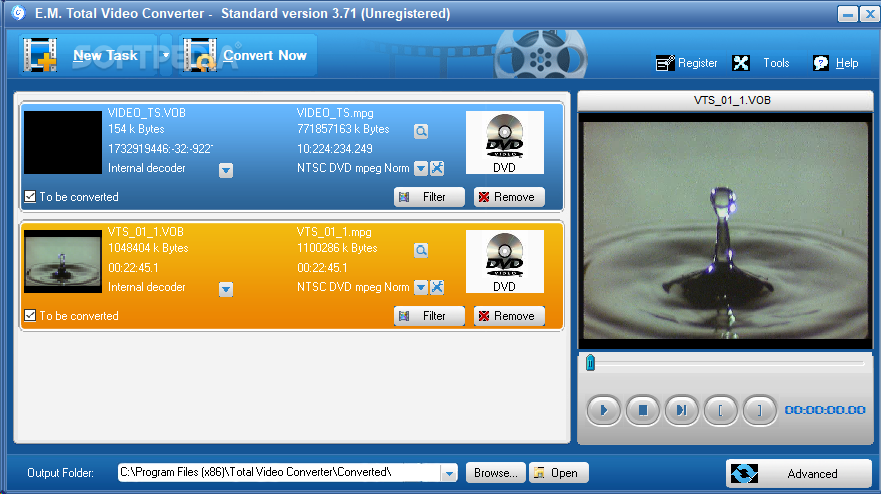
Total Video Converter


E.M. Total Video Converter is a piece of extremely powerful and full-featured converter software that supports almost all video and audio formats. The software is designed to convert video for your mobile video player as 3gp, mp4, PSP, PS3, iPod, iPhone etc and also VCD or DVD player, XBOX360.

New Total Video Converter 3.50 let you experience Unparalleled High-Definition movie. It is the best and unique software today with incomparable support for converting and burning video to AVCHD disc which can work on PS3 and Blu-ray player. Meanwhile, it supports for converting and burning video to HD formats like H.264 TS, Mpeg-2 TS, WMV-HD, MKV-HD, DivX-HD, Divx-HD, MOV-HD, FLV-HD and MP4-HD.

E.M. Total Video Converter V3.50 New Features:

1 Convert and burn video to AVCHD which can work on PS3 and Blu-ray player. What's more, the HD videos of AVCHD (*.mts, *.m2ts, *.ts) can been converted to any other video formats.
2 Convert video to HD formats like H.264 TS, Mpeg-2 TS, WMV-HD, MKV-HD, DivX-HD, Xvid-HD, MOV-HD, FLA-HD and MP4-HD
3 Convert and burn WMV-HD video to DVD. Meanwhile, it can work on XBOX360.
4 Convert and burn common video to DivX-DVD. More importantly, it can work on DVD player with DivX capability.
5 Integrate a free tool for capturing game video.

E.M. Total Video Converter V3.2 New Features:

1 Multi-language GUI.
2 Integrate a free tool for capturing desktop to any formats video.
3 Support mpeg, h264, wmv multi-thread decoding and endcoding for Multi-core CPU;
4 Support watermark through Plugin while making conversion;
5 Support VirtualDub video filter plugin;

Main Features of Total Video Converter:

* Convert all kinds of videos to mobile videos or audios (mp4, 3gp, xvid, divx mpeg4 avi, amr audio) which are used by cell-phone, PDA, PSP, iPod, iPhone, Xbox360, PS3 etc.;
* Photos slide show combines multi-photos and musics with more than 300 photos fantasy transition effect;
* High compatibility and high efficiency for Importing RMVB or RM video/audio;
* Convert various videos to MPEG videos compatible with standard DVD/SVCD/VCD;
* Burn the converted videos to DVD/SVCD/VCD;
* Rip DVD to popular videos of all sorts;
* Extract audio from various of videos and convert which to all kinds of audios (mp3, ac3, ogg, wav, aac);
* RIP CD to audios of all sorts directly;
* Support using with command line;
* Combine several video and audio files to one video file;
* Demultiplex or extract video and audio;
* Multiplex video and audio to one file

Sunday, December 6, 2009

Declutter your desktop mess with Fences


This is one of the most wonderful desktop utilities i have ever come across. If you have a headache with your desktop mess, then fences is the right choice for you. Users having large number of icons on their desktop will find Fences very useful. Its highly customisable and provides all the controls to the user to change and modify his desktop the way he wants. Even more, you can drag and drop any of the icons into any category or "fence". Just try it and you will go WOW(Microsoft promised the wow factor with vista,but trust me,Fences is not developed by microsoft ;)).

download courtesy: Download.com

Saturday, December 5, 2009

Crustal video dubber


do you want to add your own voice into video files? crystal video dubber is an easy-using tool for dubbing video files. you can add your voice into one certain segment of the video file by the microphone or add an audio files into a video file. its easy usage enables you to dub without learning. use it, your work will be much easier!

All in one utility studio


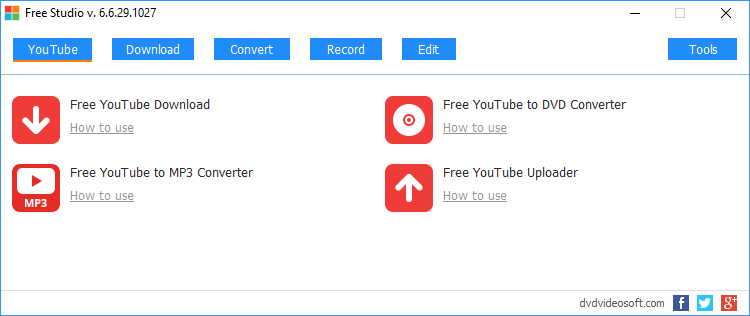
This is the blockbuster of all the converters and editors. its got everything which is required from a converter and audio video editor. The best part is that this is free.
Description

Free Studio is a single package which bundles all free software from DVDVideoSoft to work with DVD, video and audio files!

With this free software you can convert video and audio files between different formats and to iPod, PSP, iPhone, BlackBerry and other portable devices; burn and rip DVDs and audio CDs; upload and download videos and music to your computer, iPod, PSP, iPhone and BlackBerry; perform basic editing of audio and video files.
Free YouTube Download
Free YouTube to MP3 Converter
Free YouTube to iPod and PSP Converter
Free YouTube to iPhone Converter
Free YouTube Uploader

Free DVD Video Converter
Free Video to DVD Converter
Free Video to Flash Converter
Free 3GP Video converter
Free Video to iPod and PSP Converter
Free Video to iPhone Converter
Free Video to MP3 Converter
Free Video to JPG Converter
Free Audio Converter
Free Audio to Flash Converter

Free DVD Video Burner
Free Disc Burner
Free Audio CD Burner
Free DVD Decrypter
Free Audio CD to MP3 Converter

Free Video Dub
Free Audio Dub
Free Video Flip and Rotate

Tuesday, December 1, 2009

How to : Run multiple instances Yahoo! messenger on PC


Wouldn't it be great to share the same PC with your friend and also login into your respective yahoo accounts at the same time? Thats Ulta cool in my P.O.V. check this out:
1. Go to Start >> Run. Type ‘Regedit’ and press Enter. This opens the Registry editor.
2. Navigate to HKEY_CURRENT_USER\Software\Yahoo\Pager\Test
3. Right-Click on any blank space in the right panel and select New >> DWORD value. Rename this newly create DWORD key as Plural.
4. Double-Click it and change its value data to 1. Click OK.
You can now run multiple instances of YM and just invoke messenger from the desktop shortcut.

Comments